
Vector Search Explained: Finding Bookmarks by Meaning
You saved it. You know you saved it. You just can't remember what it was called. So you type a few words into the search box, and nothing comes up, because the words you remember are not the words in the title.
Search in Bookmark Manager works differently. It looks for what you mean, not for the exact letters you typed. The technique behind it goes by several names: vector search, semantic search, or simply AI search. This article explains how it works, using nothing but everyday examples from your bookmarks.
Why keyword search lets you down
Classic search is a matching game. It takes the words you typed and looks for bookmarks that contain those exact words. It is fast and predictable, and it fails the moment your memory and the title disagree.
Say you saved a summary of the book Deep Work a year ago. Today you search for "how to concentrate". A keyword search finds nothing: neither the title, the description, nor your tags contain the word "concentrate". The search has no idea that concentrating and focused work are the same thing.
| You search for | Keyword search | AI search |
|---|---|---|
| how to concentrate | Nothing | Deep Work summary, the Pomodoro technique, an article on distraction |
| bread without a machine | Only bookmarks containing "machine" | Your no-knead bread recipe |
| saving for retirement | Only bookmarks containing "retirement" | A beginner's guide to index funds |
The big idea: a map of meaning
Imagine every one of your bookmarks as a pin on a huge map. It is not a map of places but a map of meaning. Bookmarks about similar things are pinned close together. Your recipes cluster in one corner, your running plans in another, your personal finance reading somewhere else. The Deep Work summary sits right next to the Pomodoro article, even though the two share no words, because they are about the same thing.
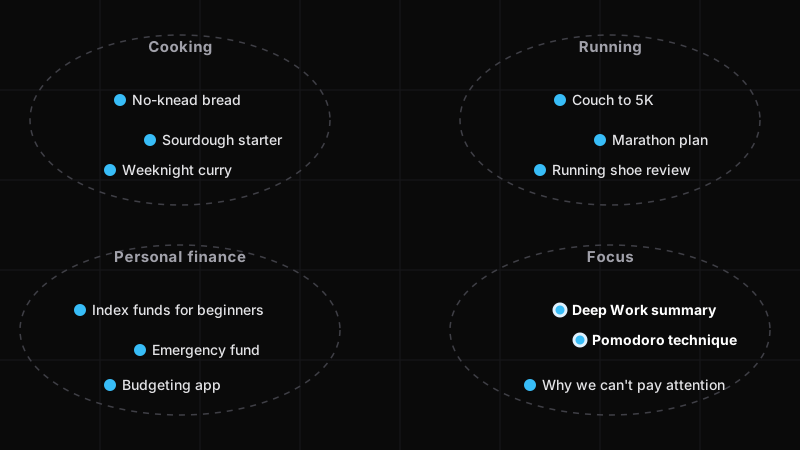
Vector search is simply search on that map. Instead of asking "which bookmarks contain these letters?", it asks "which bookmarks are pinned closest to what I mean?"
So what is a "vector"?
A pin on a map needs coordinates: a latitude and a longitude, two numbers. A vector is just that, a list of numbers that says where something sits. The difference is that two numbers are not enough to tell a bread recipe from a sourdough starter guide from a bakery review. The map of meaning needs many more dimensions, so Bookmark Manager describes every bookmark with 768 numbers. You never see them. The search does.
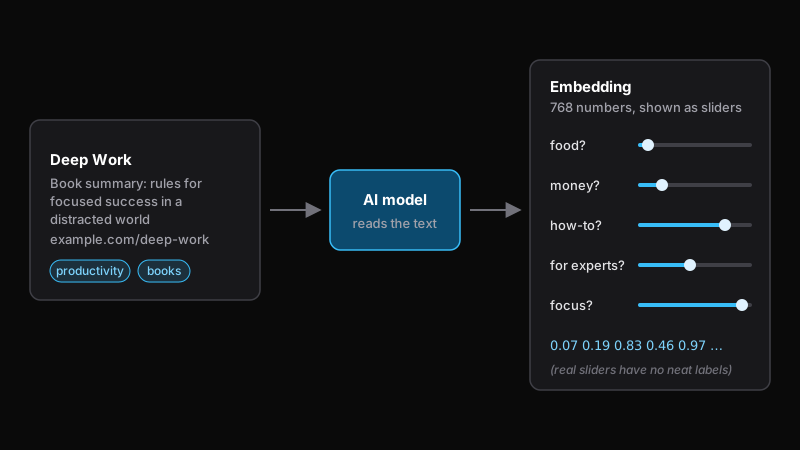
Where do the numbers come from? From an AI model that has read an enormous amount of text and learned which words and ideas belong together. Hand it the title, description, web address, and tags of a bookmark, and it returns the list of numbers. That list is called the bookmark's embedding: its place on the map.
One way to picture it: a form with hundreds of sliders. How much is this about food? About money? Is it a how-to or an opinion piece? For beginners or experts? The model sets all the sliders at once. The real sliders do not have neat labels like these, because the model worked them out on its own, but the effect is the same. Texts that mean similar things get similar settings, and similar settings put them close together on the map.
What happens when you search
- You type what you are looking for, in your own words, and press Enter.
- Your query gets the same treatment as every bookmark: the AI model turns it into a pin on the map.
- Bookmark Manager looks for the bookmark pins closest to your query and shows them, closest first.
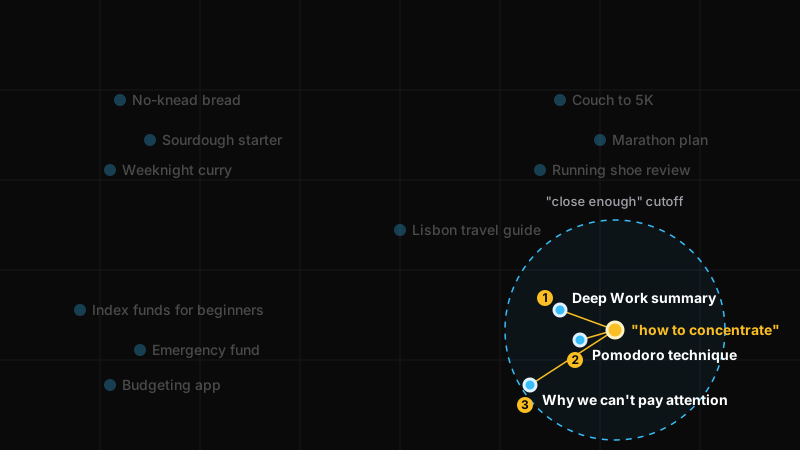
There is one more step worth knowing about. A map always has a closest pin, even when nothing on it is really about your query. So Bookmark Manager draws a line: bookmarks that are too far from your query are left out. That is why searching for random keyboard mashing returns nothing, and why an empty result means "nothing here is about that", not "something went wrong".
What this means for your bookmarks
Search the way you remember
Describe what you are looking for the way you would describe it to a friend: "that article about the guy who quit his job to grow vegetables", "video on fixing a bicycle puncture", "cheap places to stay in Lisbon". Different wording is fine. "Bike" finds "bicycle", "cheap" finds "budget", and "how to concentrate" finds Deep Work.
Combine it with tag chaining
Search ranks, tags narrow. Search for "productivity", then click the video tag to keep only the videos among the results. The tag list adjusts to show only tags that appear in the current results, exactly as described in The Power of Tag Chaining. Or start with tags and search within the selection. Either order works.
What the search actually looks at
The map is built from what is saved with each bookmark: the title, the description, the web address, and your tags. Title and description are usually filled in automatically when you save a page. The full text of the page is not read.
The practical consequence: a bookmark that is nothing but a bare web address has almost no meaning to place on the map. A proper title and a tag or two give it a clear spot. New bookmarks get their place on the map moments after you save them.
Where it falls short
AI search is about meaning, not exact text. If you are hunting for an obscure product code or a specific fragment of a web address, it may not surface at the top. Very short or vague queries such as "stuff" get vague results, because they mean very little. And if the AI search is ever unavailable, Bookmark Manager falls back to classic keyword search and tells you so.
Jargon cheat sheet
| Term | Plain English |
|---|---|
| Vector | A list of numbers that pins something to a spot on the map of meaning. |
| Embedding | The vector an AI model produces for a piece of text, such as a bookmark. |
| Vector search | Finding the pins closest to your query on that map. |
| Semantic search | The same thing, named after what it does: search by meaning. |
| Nearest neighbors | The pins closest to your query. These become your search results. |
| AI search | What the feature is called in Bookmark Manager. |
Frequently asked questions
Is vector search the same as semantic search or AI search?
Yes. All three names describe the same idea: search that compares the meaning of your query with the meaning of your bookmarks instead of matching exact words. "Vector search" describes how it works, "semantic search" describes what it does, and "AI search" is what the feature is called in Bookmark Manager.
Does vector search replace tags?
No. Search is for finding one thing you have in mind; tags are for browsing and narrowing a collection. In Bookmark Manager you can combine both: search first, then click tags to narrow the results, or the other way around.
Why does my search show no results?
Every search has a "close enough" cutoff. Bookmarks whose meaning is too far from your query are left out, so an empty list means that nothing in your collection is clearly related to what you typed. Try describing the topic in a few more words.
Does Bookmark Manager read the whole web page?
No. The search looks at what is saved with the bookmark: its title, its description, the web address, and your tags. The full text of the page is not read or stored.
Is AI search included in the free plan?
Yes. AI search is included in every plan, including the free one.
Try it on your own bookmarks
The easiest way to understand vector search is to use it. Save a handful of pages, wait a moment, and then search for one of them using words that are not in its title.
AI search is included in every plan, including the free one. Developers can also use it through the API.